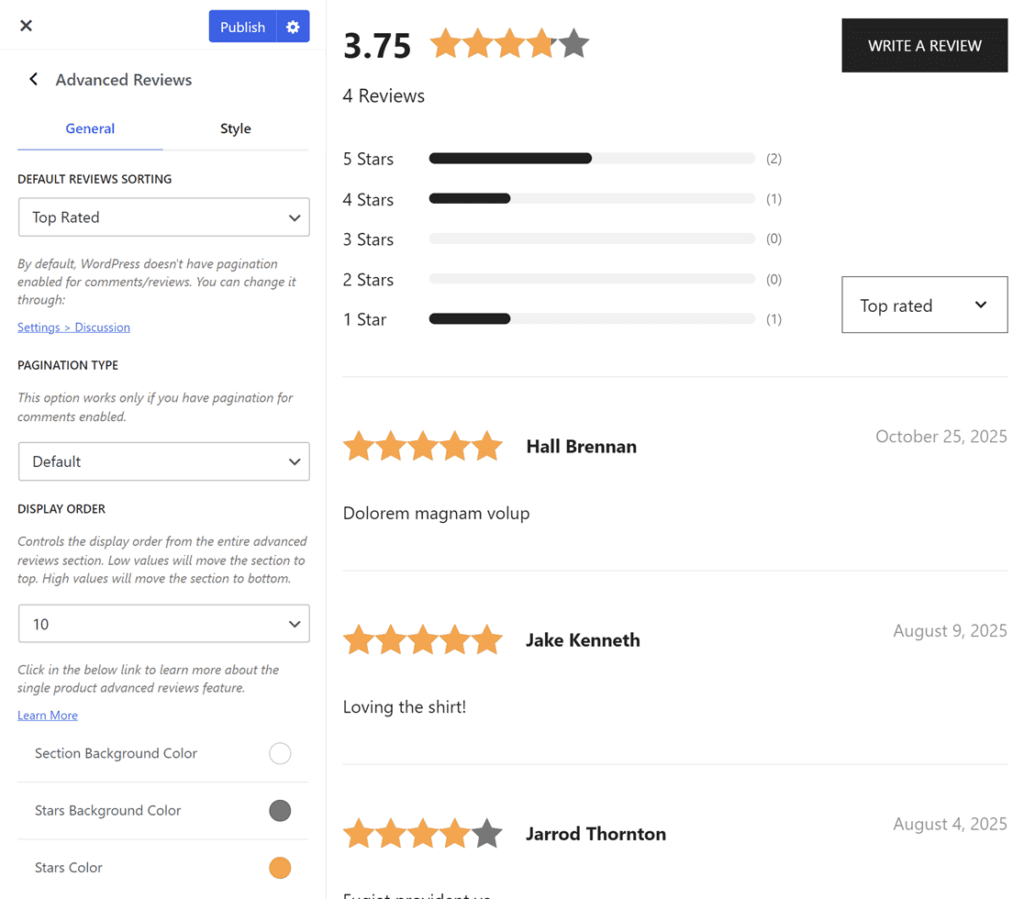
Botiga Pro improves the default WooCommerce reviews system with a new workflow and layout style. You can enable the Advanced Reviews through Appearance > Customize > WooCommerce > Single Products > Advanced Reviews.
The settings are organized into two tabs: General and Style
General
- Default Reviews Sorting: Controls the order that the reviews should be filtered on the first load of the page. Possible values are: Newest, Oldest, Top Rated, and Low Rated.
- Settings > Discussion: By default, WordPress doesn’t have pagination enabled for comments/reviews. Clicking the link within this option takes you to the default WordPress settings. To enable pagination, check the option and define “Break comments into pages with…” with your desired value.
- Pagination Type: Controls the pagination type. Two options are available: Default and Load More Button. This option only works if you have pagination for comments enabled.
- Display Order: Controls the display order of the entire advanced reviews section. Low values will move the section to the top. High values will move the section to the bottom.
Style
- Section Background Color: Sets the background color for the advanced reviews section.
- Stars Background Color: Sets the background color for the review stars.
- Stars Color: Sets the fill color for the review stars.
The Advanced Reviews module replaces the default WooCommerce reviews layout with an improved design, including star-based filtering, sorting controls, and a modern visual style.